Getting Started with Deep Clean ASMR
Install the game, finish your first dirty object, and settle into the calming cleaning loop.
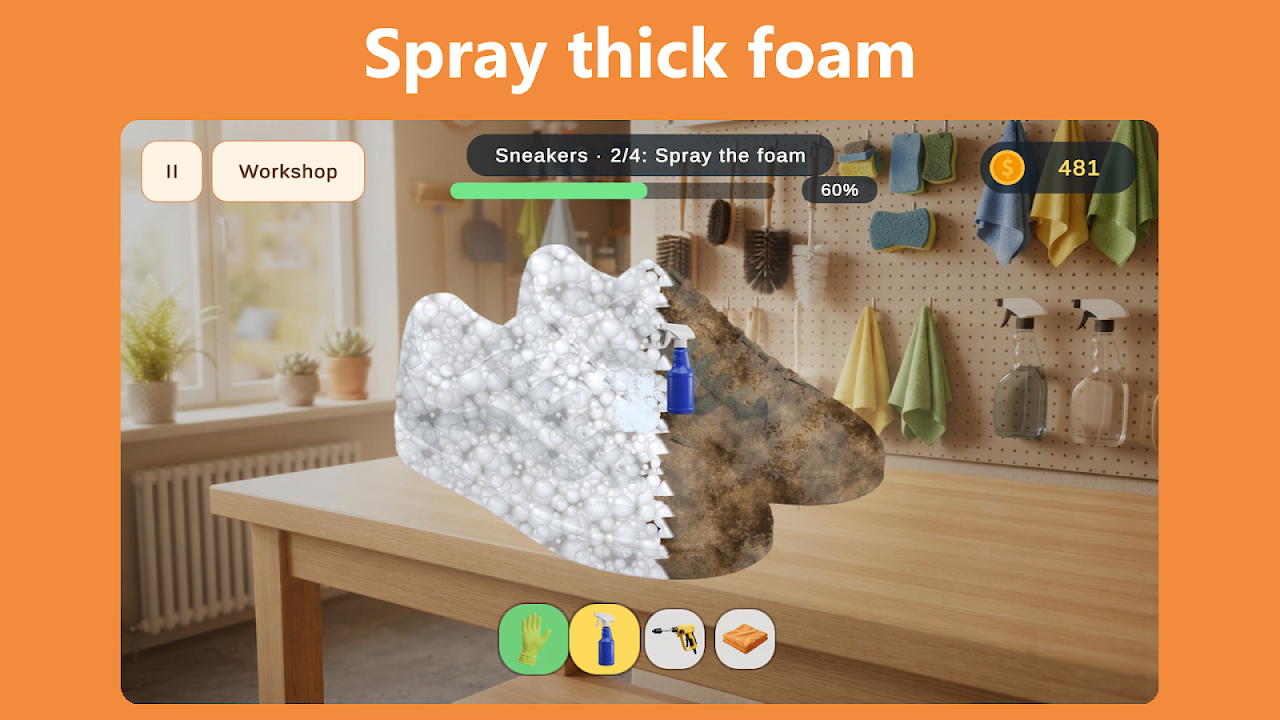
Deep Clean ASMR: Makeover is a casual Android cleaning game by GratusGames. Every level puts one filthy object in front of you — sneakers, a muddy car, a rusty grill, a dusty sofa, a phone, a bicycle, an aquarium, a statue, and more. You restore it step by step with your finger while water, foam, and polishing sounds create a soft ASMR atmosphere. This getting started guide walks you from download to your first sparkling reveal.
Install and launch
Open Google Play and search for Deep Clean ASMR: Makeover, or use the store link on our Links page. The package ID is com.TDIT.DeepCleanAsmr. The game is free with ads, rated for everyone, and works offline after download. Supported in-game languages include English, Spanish, Portuguese, and Russian. This wiki focuses on English, Spanish, Portuguese (Brazil), and French help pages.
After install, grant storage or media permissions only if the store prompt asks for them. Launch the app, skip or watch the short intro if present, and enter the first dirty item. Levels are short on purpose — perfect for a five-minute break.
Your first restoration
The core loop always follows the same order:
- Brush off leaves, stickers, and loose mud
- Spray thick foam across the dirt
- Scrub rust and grease with a sponge
- Wash everything with a pressure washer
- Polish until the surface sparkles
- Paint a new color if the level offers it
- Drag the before-and-after slider to compare
Finger motion matters. Slow circular scrubbing clears grease better than frantic tapping. Follow on-screen prompts for the active tool. When a stage completes, the next tool unlocks automatically. If vibration is enabled, gentle haptics follow your finger and reinforce the scrub feeling.
What you unlock early
The first release ships with sixteen dirty items. Early levels teach brush and foam. Mid levels lean into rust and pressure washing. Later objects such as aquariums and statues mix glass, metal, and painted surfaces. Tool upgrades widen nozzles and strengthen sponges — see the Tools Hub and Cleaning Tools pages for upgrade priorities.
Ads, offline, and calm pacing
Deep Clean ASMR contains ads. Expect interstitial or rewarded breaks between some levels. The game still works offline once assets are cached, so you can scrub on a plane or commute without data. There are no timers and no fail states for being slow. Take headphones, lower brightness if you like a softer mood, and enjoy the water and foam sounds.
Official trailer-style gameplay
The short below is an official Gratus Games clip showing a filthy car foam wash, pressure rinse, polish, and paint job. Use it as a visual reference for the loop you will play on your phone.
After the first hour
Once you have restored a few objects:
- Read How to Play for detailed controls
- Skim Tips and Tricks for upgrade order and scrub technique
- Open Item Restoration when you hit a stubborn object
- Check the Tier List for the most satisfying cleans
- Watch Updates after store patches
- Bookmark Codes for any future promo rewards
Source notes
Facts on this page come from the Google Play listing for Deep Clean ASMR: Makeover by GratusGames (first release notes listing sixteen items, offline play, tool upgrades, before-and-after slider, and language support). Store details can change — recheck the Play page if a feature looks different in your build.
You now have everything needed for day one. Pick a dirty object, put on headphones, and enjoy the shine.
Frequently Asked Questions
Quick answers about Deep Clean ASMR.
Is Deep Clean ASMR free?
Yes. It is free to download on Google Play and contains ads. Optional purchases may appear depending on the current store build.
Does the game work offline?
Yes. After install, Deep Clean ASMR supports offline play for short relaxing sessions without a network connection.
How many items can I clean?
The first release lists sixteen restore targets, including sneakers, phone, car, bicycle, aquarium, statue, and more.
Where do I go after this guide?
Continue with How to Play, then Tips and Tricks when you want smoother restores.